


Knowledge Trivia
0.00.00 Reviews
App Specs
- Version
- 1.0
- Updated On
- License
- Free
- Downloads
- 10,000+
- Developer
- WEblopzan
- Categories
- Trivia
- Platform
- Android
Screenshots
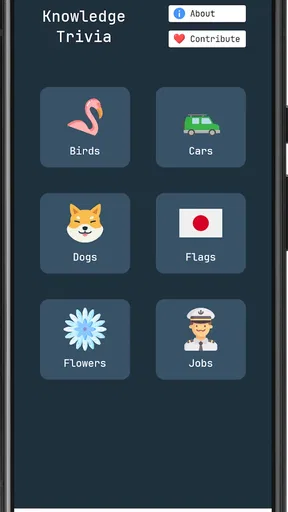
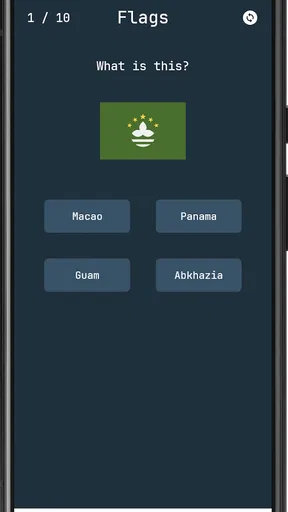
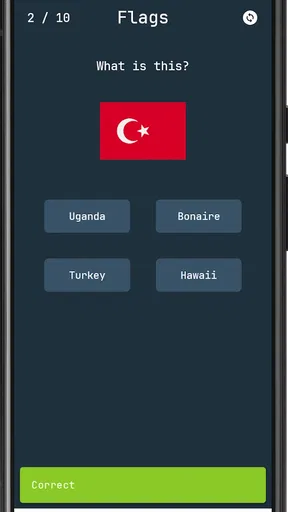
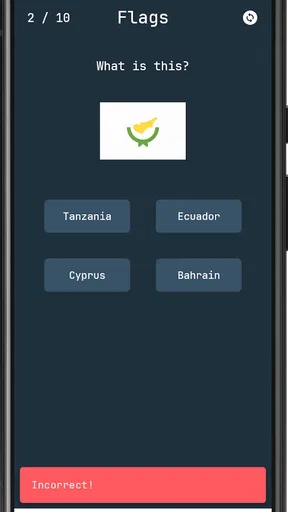
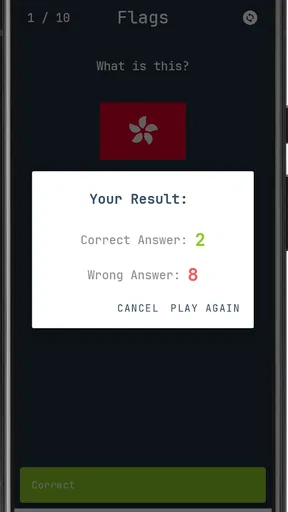
 Analysis by AppCompare
I would approach Knowledge Trivia as a quick visual quiz rather than a complete encyclopedia or a serious study tool. The basic appeal is easy to understand: look at an image, work out what it points to, and choose an answer. That makes it a natural fit for short breaks, although image questions can test recognition and careful observation as much as general knowledge. If you enjoy that mix, it can make an ordinary few spare minutes feel more engaging.
A good fit for short, picture-led quiz sessions
As a trivia game from WEblopzan, Knowledge Trivia is built around answering image questions across different topics. That format gives each question a small puzzle element: before answering, I would look for the most useful clue in the picture rather than rush to name the first thing it brings to mind. A familiar object, place, person, or detail may be the key, so pausing briefly can be more effective than guessing from the broad theme alone.
That visual emphasis also sets expectations. Someone who likes word-only quizzes, long explanations, or a structured course may prefer another kind of app. Knowledge Trivia makes more sense for people who enjoy connecting pictures with facts and want a lightweight challenge. It is aimed at everyone, so it can suit a range of ages, but younger players may still benefit from playing alongside someone who can talk through unfamiliar references.
How I would make the routine work
The most useful habit is to treat each image as a clue to inspect, not just decoration. I would first identify what is plainly visible, then consider which topic it might belong to, and only then settle on an answer. This simple order helps reduce impulsive guesses, especially when an image could point toward several related ideas. If I miss a question, I would take a moment to remember the clue and answer together; that makes a repeat more useful than merely seeing the same prompt again.
It also helps to choose a session length that suits the moment. For a quick break, a few questions are enough to keep the game casual. When I have more time, I can slow down and think through the less obvious images instead of tapping simply to move on. I would not turn every round into a test of speed unless the game clearly rewards that approach: for picture trivia, accuracy and observation can be more satisfying than racing.
What to check before settling in
Knowledge Trivia is free to download, with optional in-app purchases ranging from twenty-nine cents to forty-nine dollars and ninety-nine cents per item. I would check the purchase details before confirming anything, particularly if a child is going to use the device. The free entry point makes it easy to try the basic experience, while the presence of paid items is a reason to keep spending deliberate rather than assume every part of the game is included.
The game was released on December 13, 2025, and its current version is 1.0. It has over ten thousand installs, and the minimum Android requirement is version 6.0. Those details make compatibility worth checking on an older phone before downloading. The sensible approach is to confirm that the device meets the requirement, then try a short session and decide whether the image-question style actually suits you before making any purchases.
Worth Reading Before You Choose

Flipboard Shows What News Apps Must Do Beyond the Feed

Switching to Android Auto Means Rethinking Your Driving Routine

Google Calendar Makes a Crowded Week Easier to Manage

Ludo King Makes the Most of the Minutes Between Plans

Baby Panda World Brings Quick Play to Modern Phones, but Its Game Library Feels Busy

ESPN’s Live Game View Makes Following Close Games Easier
Where it sits among trivia games
Compared with a conventional multiple-choice quiz that presents only written questions, an image-led format asks me to interpret what I can see before I use what I know. That can feel more approachable when I am tired of reading through blocks of text, but it may be less appealing if I prefer clear subject labels or detailed explanations after every answer. Knowledge Trivia’s broad topic framing is useful for variety; it also means players looking for a deep, carefully organized course in one subject should choose a more specialized learning app.
For a shared moment, I would put the game in front of a friend or family member and take turns explaining the clue each of us noticed. That turns a solo guess into a small conversation without needing to make the session competitive. If someone is new to a topic, talking through the picture can make the challenge less intimidating. If the group wants a formal head-to-head match or a long-term scoring system, it is worth checking that the available play options fit before planning around them.
Getting Started
First things first, downloading Knowledge Trivia was a breeze. Available on both Android and iOS, it’s just a quick search away. Once I launched it, I was met with a clean and vibrant interface that really sets the mood for a fun trivia session. The colors are inviting, and navigating through the app feels intuitive, which is a big plus in my book.
Setting up an account is straightforward. You can either sign up with your email or simply connect through social media, which honestly saves some time. I went the social media route and was up and running in under a minute. No fuss, no muss.
The Gameplay
Now, onto the meat of it—the trivia itself! Oh boy, was I in for a ride. The app offers a wide range of categories: history, science, pop culture, sports, you name it. I started with my favorite—science—and was pleasantly surprised by the depth of the questions. They range from easy to "I should really know this but I don’t," making it perfect for both casual players and trivia aficionados.
One feature I absolutely love is the multiplayer mode. It lets you challenge friends or random players from around the world. There's nothing like a little friendly competition to get the adrenaline pumping. Plus, the leaderboard keeps things exciting, pushing you to climb higher and higher.
Features That Stand Out
There are a few features that make Knowledge Trivia stand out from the crowd. One is the daily challenge. Every day, you get a set of new questions that you can tackle for extra points. It keeps me coming back, and I’ve made it a part of my morning routine.
Another cool addition is the "Trivia Marathon." This mode gives you a massive set of questions to answer in one sitting. It's perfect for those days when you just want to immerse yourself in trivia without getting up. Trust me, it’s addictive!
Areas for Improvement
While there’s a lot to love, no app is perfect. Sometimes, the app can be a bit slow to load, especially during peak times. It’s not a deal-breaker, but it can be frustrating when you’re all set for a quick trivia fix.
Additionally, I noticed that some questions repeat more often than I’d like. It’s great for reinforcing knowledge, but after a while, it starts to feel a bit redundant. I’m hoping they roll out more updates with fresh questions soon.
Final Thoughts
All in all, Knowledge Trivia is a solid choice for anyone who loves trivia. It’s engaging, challenging, and has that addictive quality that keeps you coming back for more. While it has a few kinks to iron out, the overall experience is enjoyable and rewarding. If you’re on the lookout for a new trivia app to keep your brain sharp, give this one a try. You might just find yourself glued to your phone, climbing the trivia leaderboard!
So, what do you think? Ready to test your knowledge and see how you stack up against the rest of the world? Happy quizzing!
A realistic way to fit it into the day
I would use the daily challenge as a natural stopping point on a commute or during a coffee break, rather than opening the game without a plan and letting a quick visit turn into a long one. A repeatable routine can be as simple as reading the image carefully, making one considered choice, and moving on without treating every answer as a score to defend. If I have a few extra minutes, I can revisit the idea behind a missed answer; if I am short on time, I can leave the longer session for later.
The marathon mode suits a different mood. It is a better choice when I have a quiet stretch and want sustained play, not when I am waiting in a line and may need to put the phone away at any moment. That distinction matters: a large run of questions can be enjoyable, but it is not automatically the best way to use a picture quiz. I would choose the shorter daily routine for consistency and save the marathon for an unhurried evening.
Small habits that make image questions fairer
When a picture seems obvious, I would still check whether a smaller detail changes the likely answer. The central subject might be familiar while a background object, setting, or visual association points to a more specific response. A useful personal rule is to name two plausible interpretations before selecting one. It slows down snap guesses without turning every question into a lengthy analysis, and it helps me notice when I am answering from habit rather than from the image itself.
For repeat questions, I would avoid memorizing only the answer. Pairing it with the clue that led to it makes the next encounter feel like recall rather than a lucky tap. Repetition can be a genuine drawback when I want fresh material, but it can also expose a weak spot in my memory. The trade-off is worthwhile only if the game continues to feel varied enough; if familiar prompts dominate a session, I would switch to something else rather than mistake repetition for new learning.
Competition, company, and expectations
The multiplayer and leaderboard elements described in the game make it more appealing to players who enjoy a visible goal or a friendly challenge. I would keep that competition light: compare how each person interpreted a picture, then talk through why one answer seemed more convincing. That keeps the social part enjoyable even when players have different strengths. A leaderboard can motivate a regular player, but it is less useful to someone who would rather explore questions at their own pace and has no interest in comparing results.
For a family setting, I would let players take turns explaining their reasoning instead of handing the device to the fastest person. It gives younger or less confident players room to contribute and makes visual observation part of the fun. Since the game is rated for everyone, it is broadly suitable for mixed-age play, though that rating does not mean every question will be equally familiar to every age group. A little conversation can bridge that gap better than expecting everyone to know the same references.
What I would not expect from it
I would not use Knowledge Trivia as a dependable way to prepare for an exam or learn a subject in sequence. Its appeal is the quick recognition challenge across topics, not a planned curriculum. Someone who needs explanations, citations, adjustable study goals, or a systematic review path will be better served by a dedicated learning resource. Likewise, players who want an elaborate narrative, a deep collection-building loop, or detailed control over the quiz format should look for a game designed around those priorities.
It is also worth separating a lively interface from a consistently smooth session. The original experience includes moments when loading feels slow and questions recur more than I would like. Those issues matter most if I depend on the game for very brief breaks: a delay can consume the time I set aside, while a repeated image can make a session feel less rewarding. If either problem becomes frequent, I would keep the app as an occasional change of pace rather than make it my main trivia habit.
My verdict after weighing the trade-offs
Knowledge Trivia is easiest to recommend to someone who likes visual clues, broad trivia, and the option to switch between a brief daily visit and a longer stretch of play. Its most useful quality is the simple mental move from image to answer; its main caveats are the possibility of repeated questions, occasional loading delays, and paid items alongside the free download. I would try it with a modest routine first, keep purchases intentional, and judge it by whether the pictures stay interesting after the novelty wears off.
If you want a casual way to test recognition and general knowledge, this is a reasonable game to explore. If your priority is a carefully structured lesson, a consistently new question bank, or a highly customizable quiz experience, I would choose a more specialized alternative. For me, the best way to enjoy it is to stay curious about the image, use competition as an optional extra, and stop when the session stops feeling fresh.
Pros
- Engaging questions keep users intrigued.
- Varied difficulty levels suit all players.
- Regular updates add fresh content.
- Offline mode available for on-the-go play.
- User-friendly interface enhances experience.
Cons
- Limited free plays without upgrades.
- Ads can be intrusive during gameplay.
- In-app purchases can be pricey.
- Some questions repeat over time.
- Leaderboard requires account sign-in.
FAQs for Knowledge Trivia
What is Knowledge Trivia and how does it work?
Knowledge Trivia is an engaging quiz app designed to test your knowledge across various subjects such as history, science, and pop culture. Players can choose from different categories, answer multiple-choice questions, and earn points for correct answers. The app also offers a leaderboard to compete with friends or other players globally.
Is Knowledge Trivia free to download and play?
Yes, Knowledge Trivia is free to download and play. However, it may offer in-app purchases for additional features, such as unlocking premium question packs or removing ads. These purchases are optional and designed to enhance the user experience without affecting the core gameplay.
Can I play Knowledge Trivia offline?
Knowledge Trivia requires an internet connection to download new questions and sync your progress with the leaderboard. However, once questions are downloaded, you can enjoy playing some categories offline. To fully benefit from the app’s features, such as global ranking updates, an active connection is recommended.
How often are new questions added to Knowledge Trivia?
The app frequently updates its question database to ensure that players have fresh content to enjoy. New questions are typically added weekly, covering trending topics and expanding existing categories. This keeps the game exciting and challenging for regular players who crave new trivia challenges.
Is there a multiplayer mode in Knowledge Trivia?
Yes, Knowledge Trivia features a multiplayer mode where you can challenge friends or random opponents to a trivia battle. This mode allows players to compete in real-time, answering the same set of questions to see who scores higher. It adds a competitive and social element to the gaming experience.


